Solo Creator, First Income in October 2026: Form 2210 and the Annualized Worksheet
This is education, not tax advice. I'm not a CPA or EA. State taxes are not covered.
The Form 2210 and Schedule AI read below are the 2025 editions — the latest posted as of 2026-10-07; the 2026 form and the 2026 Instructions for Form 2210 are not yet posted. Publication 505 (2026) is this article's 2026 source. If a line changes, this page is updated in place with a dated note at the foot of the article.
- Last checked
- Tax year
- 2026
- Core line
- Schedule AI, line 27 — annualized income installment; entered on Form 2210, Part III, line 10
- Changes
- Update log (5)
The underpayment penalty is figured period by period, and the regular installment method assumes each period held a quarter of the year. Schedule AI is the printed alternative: it recomputes each period from the income actually received by that period's cutoff, and its line 27 result enters Form 2210 at Part III, line 10. In this article's example — a creator whose first income arrived in October — the first three columns come out at zero required installments, and the year's installment is built in column (d). (The Form 2210 and Schedule AI read here are the 2025 editions, the latest posted.)
This article is for you if you're a solo creator whose first self-employment income of 2026 arrived late in the year, after estimated-tax due dates had already passed.
§1One job, one tax year, one line
One job, one tax year, one line. The job is solo creator. The year is 2026. The line is Schedule AI, line 27 — the annualized income installment, the figure that leaves this worksheet and enters Form 2210 at Part III, line 10.
The situation is printed in the calendar. This creator's channel earned nothing in January, and nothing through the summer; the first income of the year arrived in October. By then, three of the year's four estimated-tax due dates had already passed, each figured as if the year's income were spread evenly across it.
One status note before any line is read. The Form 2210 and Schedule AI in this article are the 2025 editions, the latest the IRS has posted; the 2026 form and its instructions are not out yet. Publication 505 for 2026 is this article's 2026 source.
§2The penalty is figured period by period
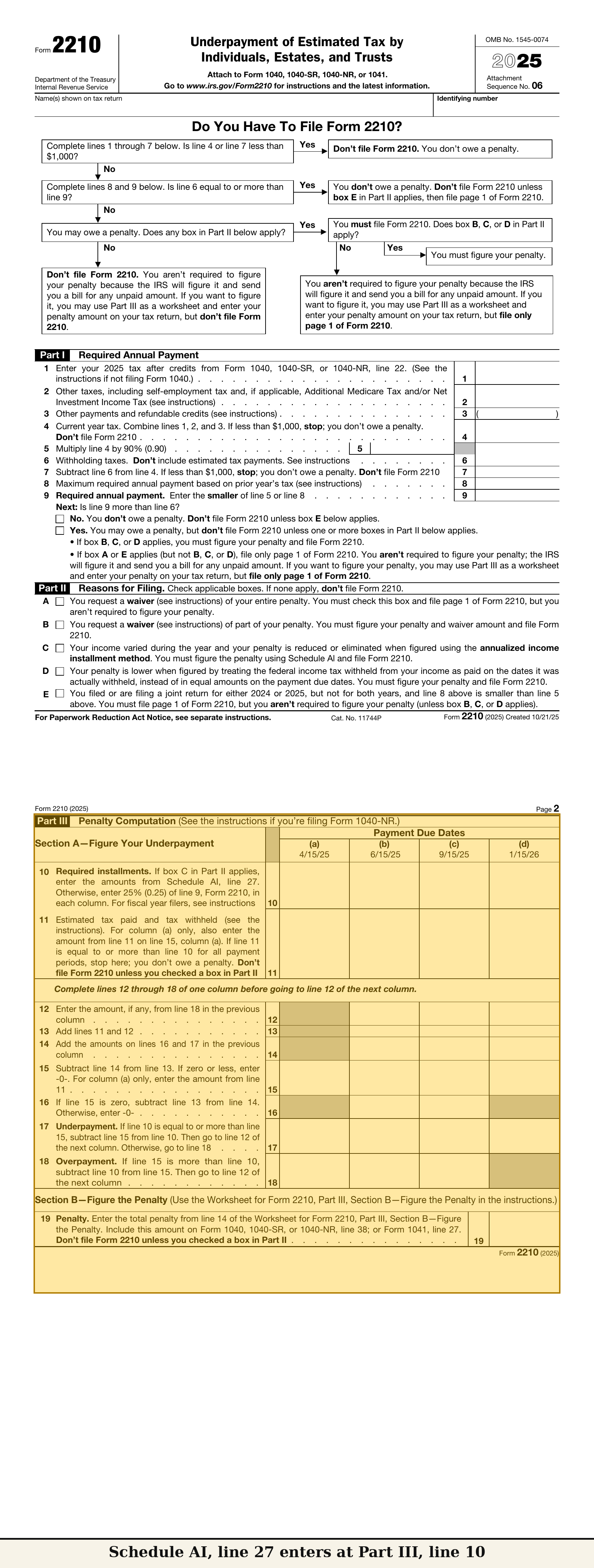
Start with how the underpayment penalty is figured.
The instructions for Form 2210 figure the penalty separately for each payment period — four periods, four separate computations. A payment made later in the year is applied where the form applies it; it does not reach back and erase an underpayment already figured for an earlier period. The regular installment method, from Article 1, divides the required annual payment into four equal installments, one per due date, whatever the income was doing in those months.
The annualized income installment method is the printed alternative for income that does not arrive evenly. Publication 505 for 2026 carries it as Worksheet 2-9 — completed after Worksheet 2-1, through line 14b — and the publication is plain about the paperwork: using the annualized method to figure payments means filing Form 2210 with the return. Instead of assuming each period held a quarter of the year, Schedule AI recomputes each period from the income actually received by that period's cutoff. That recomputation is the whole article.
§3The rate on the penalty: federal short-term rate plus 3 points
Each period's penalty is the underpayment rate, times the underpayment amount, times the period of the underpayment. The rate itself is not fixed in the form: under section 6621, the underpayment rate for an individual is the federal short-term rate plus 3 percentage points, rounded to the nearest full percent. The Secretary determines the federal short-term rate during the first month of each calendar quarter, and that rate applies during the first calendar quarter beginning after that month — which is why the rate changes four times a year. One special rule matters for estimated tax: the rate that applies during March, the third month following the taxable year, also applies during the first 15 days of April. And unlike ordinary interest, the addition to tax under section 6654 is computed at the section 6621 rate per annum without daily compounding.
For 2026, the IRS quarterly-rates page prints the following non-corporate underpayment rates, checked 2026-10-31: first quarter (January–March) 7%, second quarter (April–June) 6%, third quarter (July–September) 7%, fourth quarter (October–December) 7%. The fourth-quarter rate is confirmed by Revenue Ruling 2026-15, which establishes 7% for the calendar quarter beginning October 1, 2026, and states that the same rate applies to estimated tax underpayments for that quarter. On the form, these rates enter through Form 2210, Part III, Section B: the instructions' worksheet and Table 2 carry the daily rates and the number of days for each period, so each period's penalty uses the rate in force for that period.
This table is dated, and deliberately so. The rates are reset every quarter, and 2027 rates are not yet knowable — do not carry the 2026 rates into a 2027 computation. When a new quarter's rate posts on the IRS quarterly-rates page, this section's table is re-read before it is quoted anywhere.
§4Reading Schedule AI, Part I
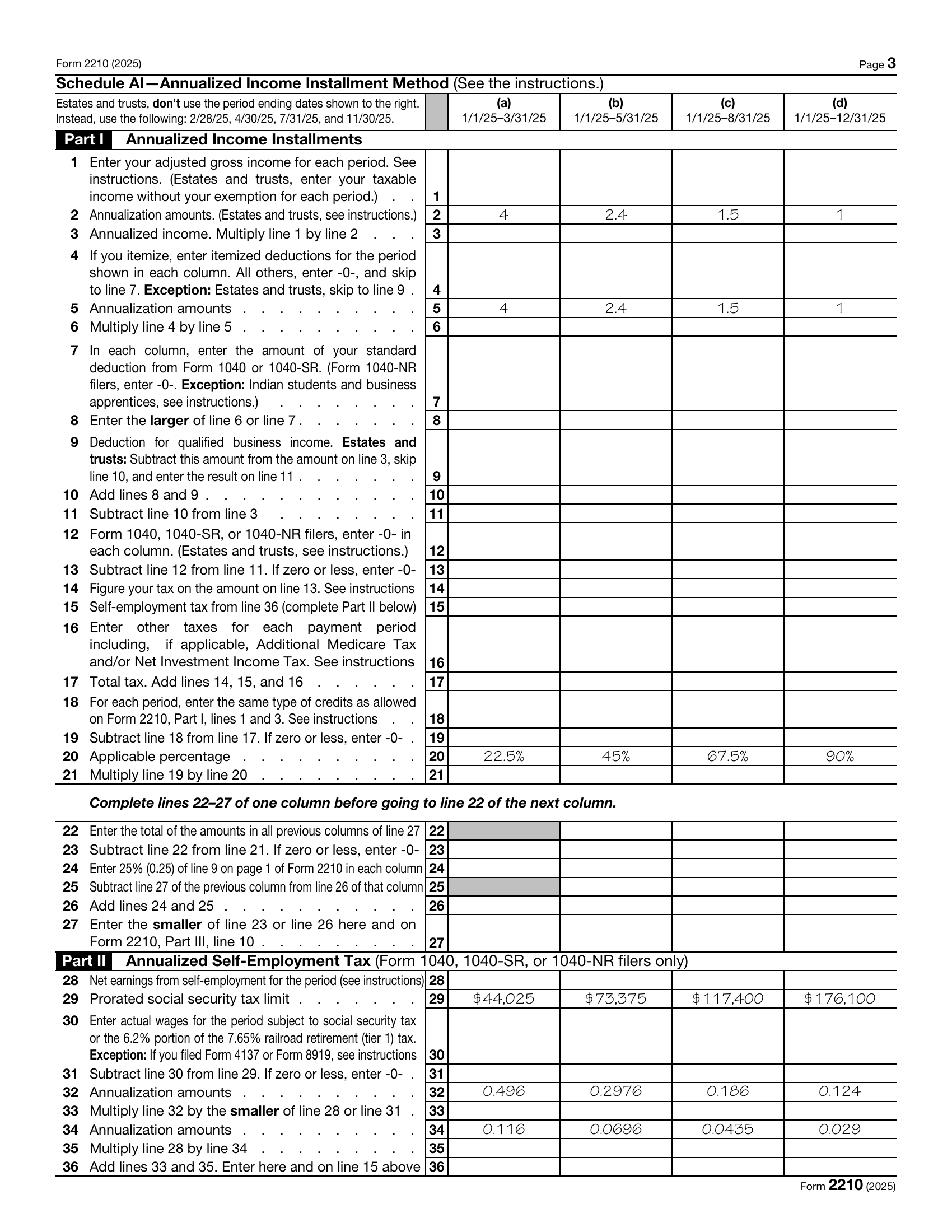
Schedule AI has four columns, and they are cumulative. Column (a) covers January 1 through March 31. Column (b) covers January 1 through May 31 — it contains column (a)'s months. Column (c) runs January 1 through August 31, and column (d) is the full year.
Line 1 enters adjusted gross income for the period. Lines 2 and 5 print the annualization amounts: 4, 2.4, 1.5, and 1. Line 3 is line 1 times line 2: annualized income. Lines 4 through 8 build the deduction: line 4 is the period's itemized deductions; line 6 multiplies line 4 by line 5's annualization amount; line 7 is the standard deduction; line 8 takes the larger of line 6 or line 7. Line 9 is the qualified business income deduction. Line 10 adds lines 8 and 9, and line 11 subtracts line 10 from line 3. Line 13 is the taxable income that build produces, and line 14 is the tax on line 13. Line 15 is where the self-employment tax enters, from Part II of this same schedule. Line 16 is other taxes. Line 17 totals lines 14 through 16. Line 18 is credits, and line 19 subtracts line 18 from line 17.
Then the installment build, lines 20 to 27. Line 20 prints each column's applicable percentage: 22.5 percent, 45 percent, 67.5 percent, 90 percent. Line 21 is line 19 times line 20. Line 22 enters the total of the amounts in all previous columns of line 27. Line 23 subtracts line 22 from line 21. Line 24 is the benchmark from the regular method: 25 percent of the required annual payment from Form 2210, Part I, line 9. Lines 25 and 26 carry that benchmark's running total, and line 27 takes the smaller of line 23 or line 26. Line 27, in all four columns, is entered on Form 2210, Part III, line 10, where the underpayment is figured to the penalty at line 19.
One rule governs the whole schedule: if Schedule AI is used for any due date, it is used for all due dates. Box C in Part II of Form 2210 is checked; Parts I through III are attached with the schedule. There is no column-picking.
§5Worked example, Part I: three zero columns
One worked example, with numbers used only in this article.
A solo creator — hypothetical, not a prediction, not your numbers — has no income at all from January through September 2026; the first income arrives in October, and across October through December the net profit is $30,000.
Run the columns. In column (a), line 1 is zero — no income by March 31. Line 3, annualized income, is zero times 4: zero. Line 19 is zero, line 21 is zero — 22.5 percent of zero — and line 23 is zero. Line 27 is the smaller of line 23 or line 26, and with line 23 at zero, line 27 is zero, whatever the regular-method benchmark on line 24 holds. Columns (b) and (c) read identically: no income by May 31, none by August 31, so line 1 is zero and every line built on it is zero, down to line 27.
Column (d) is where the year's income finally enters. Line 1 carries the full-year figure, and the column runs through the same lines — line 14 is the tax on the annualized taxable income — and line 15 receives the annualized self-employment tax from Part II: $4,238.87, computed line by line in the next section. Line 21 takes 90 percent of line 19. Line 22 enters the total of the amounts in all previous columns of line 27 — zero, zero, and zero here. Line 23 subtracts line 22 from line 21, and what reaches line 27 in column (d) is the year's single installment.
| Schedule AI line | Column (a) 1/1–3/31 | Column (b) 1/1–5/31 | Column (c) 1/1–8/31 | Column (d) 1/1–12/31 |
|---|---|---|---|---|
| 1 — AGI for the period | $0 | $0 | $0 | Full-year figure enters here (structure only) |
| 2 — Annualization amount | 4 | 2.4 | 1.5 | 1 |
| 3 — Annualized income (1 × 2) | $0 | $0 | $0 | — |
| 19 — Total taxes less credits | $0 | $0 | $0 | Includes line 15 (col. d): $4,238.87 |
| 20 — Applicable percentage | 22.5% | 45% | 67.5% | 90% |
| 21 — Line 19 × line 20 | $0 | $0 | $0 | 90% of line 19 (structure only) |
| 23 — Line 21 − line 22 (prior line 27s) | $0 | $0 | $0 | Line 21 − $0 |
| 27 — Required installment (smaller of line 23 or line 26) → Form 2210 Part III, line 10 | $0 (line 23 is the smaller) | $0 | $0 | The year's single installment (structure only) |
§6Worked example, Part II: annualizing the SE tax
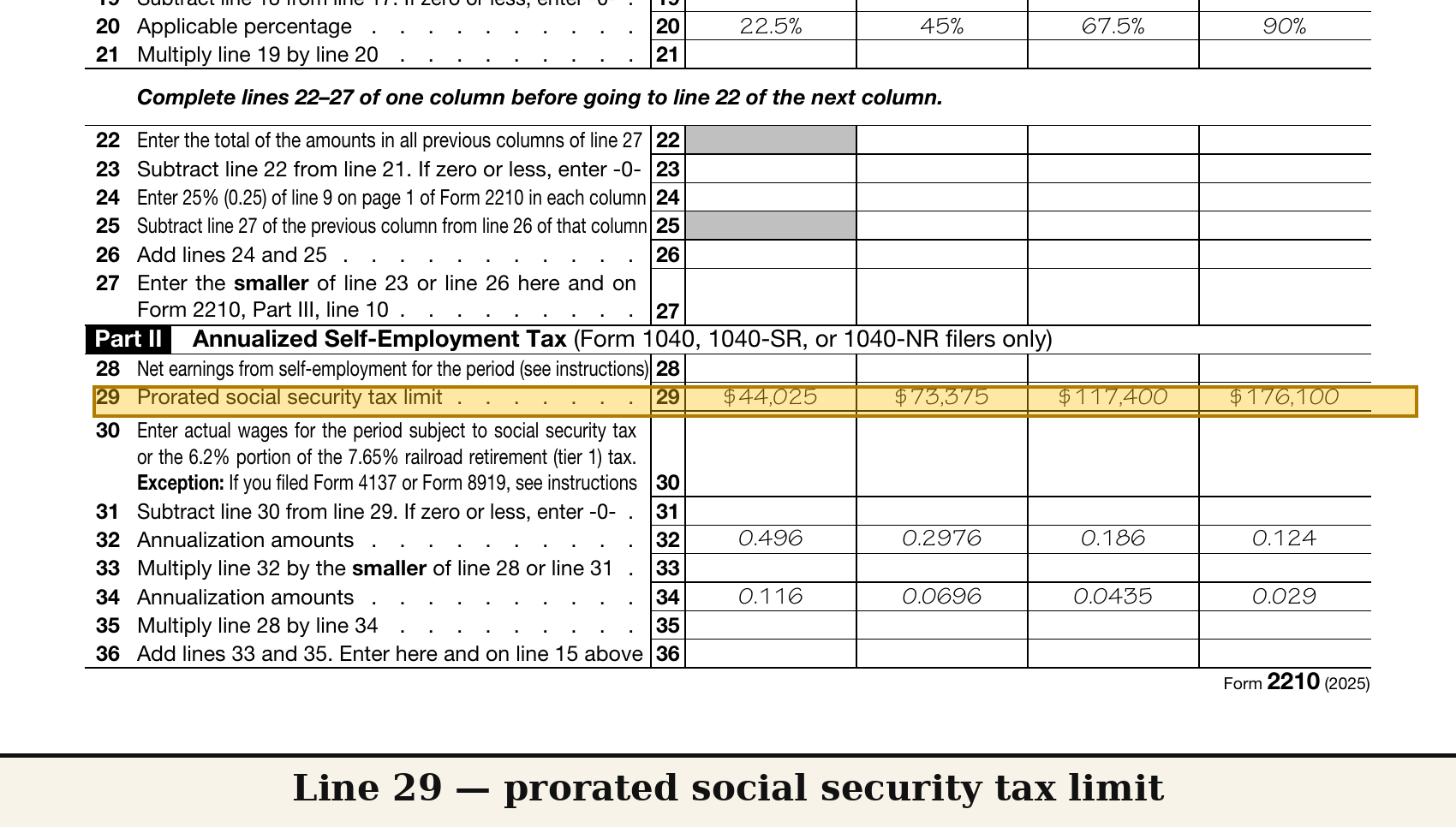
Part II of Schedule AI figures the annualized self-employment tax that feeds line 15.
Line 28 is the period's net earnings from self-employment, and the instructions give its build: the period's net profit times 92.35 percent. In columns (a), (b), and (c) there is no profit, so line 28 is zero and Part II produces zero — the same result the schedule prints for any period under the $400 line, where Part II is not required at all.
Column (d). Line 28 is $30,000 times 92.35 percent: $27,705. Line 29 is the prorated Social Security limit for the period — and here the reading stops at structure: the 2025 form prints dollar amounts on line 29 built from that year's wage base; the 2026 form is not posted, so no line 29 figure is read in this article. Line 30 is Social Security wages for the period; this creator has none, so line 30 is zero, and line 31 is line 29 minus zero. Line 32 prints the annualization amounts for the Social Security part: 0.496, 0.2976, 0.186, and 0.124 across the columns. Line 33 multiplies line 32's amount by the smaller of line 28 or line 31 — so watch the comparison before the multiplication. In column (d), line 31 is the full-year prorated limit from line 29 minus $0 of Social Security wages: a figure built from the wage base, far above line 28's $27,705. Line 28 is the smaller figure, so line 33 in column (d) is $27,705 times 0.124 — $3,435.42. Line 34 prints the Medicare-part amounts — 0.116, 0.0696, 0.0435, 0.029 — and line 35 multiplies line 28 by line 34's amount, with no limit line in between: $27,705 times 0.029 is $803.45. Line 36 adds them: $3,435.42 plus $803.45 is $4,238.87. That is the figure that enters line 15, column (d).
| Schedule AI line | Columns (a)–(c) | Column (d) | Operation |
|---|---|---|---|
| 28 — Net earnings from SE for the period | $0 (no profit in period) | $27,705 | Period net profit × 92.35% ($30,000 × 0.9235) |
| 29 — Prorated Social Security limit | — | Not read — 2026 form not posted; the 2025 form's printed amounts come from the 2025 wage base | Structure only |
| 30 — Social Security wages for the period | $0 | $0 | None in this example |
| 31 — Line 29 − line 30 | — | Line 29 − $0 | — |
| 33 — Social Security part | $0 | $3,435.42 | Line 32 amount (col. d: 0.124) × smaller of line 28 or line 31 ($27,705 × 0.124) |
| 35 — Medicare part | $0 | $803.45 | Line 28 × line 34 amount (col. d: 0.029) ($27,705 × 0.029) |
| 36 — Annualized SE tax → line 15 | $0 | $4,238.87 | $3,435.42 + $803.45 |
§7What the zeros do, and what they never promise
Read what the example actually shows, and what it does not.
It shows the mechanism. Because each column is recomputed from income received by its own cutoff, a year that starts in October produces a zero required installment in the first three columns of this worksheet.
It does not show a penalty being waived, forgiven, or promised away — and this site does not promise that. The penalty is figured period by period from the filer's own completed lines. A creator whose first income arrived in June would still show zero in columns (a) and (b) — column (b) ends May 31 — and the first nonzero column would be (c), January 1 through August 31; column (d) here carries a full installment built on the whole year's income. Schedule AI does not skip periods. It recounts them.
§8What changed for tax year 2026
One figure in this form's arithmetic moved with the calendar, and one set of figures is deliberately left blank.
The Social Security wage base — the ceiling that Schedule AI's line 29 prorates across the four columns — rose from $176,100 for 2025 to $184,500 for 2026, as published by the Social Security Administration. That is the only TY2026 figure added here. The prorated line 29 amounts themselves are not printed for 2026 in this article: the final 2026 Schedule AI is not posted as of 2026-10-26 (the 2026 Form 2210 appears on the IRS draft-forms list only), and this article does not read dollar figures off a draft. When the final Schedule AI posts, the line 29 column amounts are rechecked against it and this table is updated in place.
| Item | TY2025 | TY2026 | Source | As of |
|---|---|---|---|---|
| Social Security wage base (the ceiling behind Schedule AI, line 29) | $176,100 | $184,500 | Social Security Administration, Contribution and Benefit Base | 2026-10-26 |
| Schedule AI, line 29 prorated amounts (22.5% / 45% / 67.5% / 90% of the wage base) | $44,025 / $73,375 / $117,400 / $176,100, as printed on the 2025 form | Recheck after the final 2026 form is posted — not printed here | Schedule AI (Form 2210), line 29 | 2026-10-26 |
| Self-employment tax build (net profit × 92.35%; 12.4% Social Security + 2.9% Medicare) | As printed on the 2025 form | Same structure — No change | Schedule AI (Form 2210), Part II | 2026-10-26 |
§9Column (c) alone: a June start, priced in Part II
The section above already says what a June start does in words: the first nonzero column would be (c), January 1 through August 31. The second illustration below, as of 2026-10-26, prices column (c) — in Part II only, on a separate hypothetical from the October example's $30,000. No Part I dollar amount is priced here, for the same reason the October example prices none: column (d)'s Part I figure is an AGI build, not a net-profit figure, and this block does not build one.
June through August net profit in this illustration: $13,700. With no Social Security wages in this illustration, line 30 is $0, so line 31 is line 29 minus $0 — and line 29 is still not read as a dollar figure, because the 2026 Schedule AI is not posted. The comparison on line 33 is read the same way the October example reads it: line 31 is built from the wage base, far above line 28, so line 28 is the smaller figure.
| Schedule AI line, column (c) | Figure |
|---|---|
| 28 — Net earnings from SE for the period | $13,700 × 92.35% = $12,651.95 |
| 29 — Prorated Social Security limit | Not read — 2026 form not posted (structure only) |
| 31 — Line 29 − line 30 ($0) | Larger than line 28, so line 28 is the smaller figure |
| 33 — Social Security part | $12,651.95 × 0.186 = $2,353.26 |
| 35 — Medicare part | $12,651.95 × 0.0435 = $550.36 |
| 36 — Annualized SE tax → line 15, column (c) | $2,353.26 + $550.36 = $2,903.62 |
$2,903.62 is column (c)'s line 15 figure, and nothing more: it is the annualized self-employment tax for the June–August period, not the column's line 27 installment, which still needs the Part I build this block deliberately leaves unpriced. Columns (a) and (b) in this illustration are zero, exactly as in the October example — the first income arrived in June, after both cutoffs — so column (c) is where the year's installment build first becomes nonzero, and column (d) will recount the whole year again from its own cutoff.
The regular method this worksheet replaces is Article 1; the self-employment tax this part annualizes is figured on Article 2; and the worksheet that must be completed through line 14b before this one runs is Article 11. How each figure above was checked is described on How we verify.
§10What this form does not cover
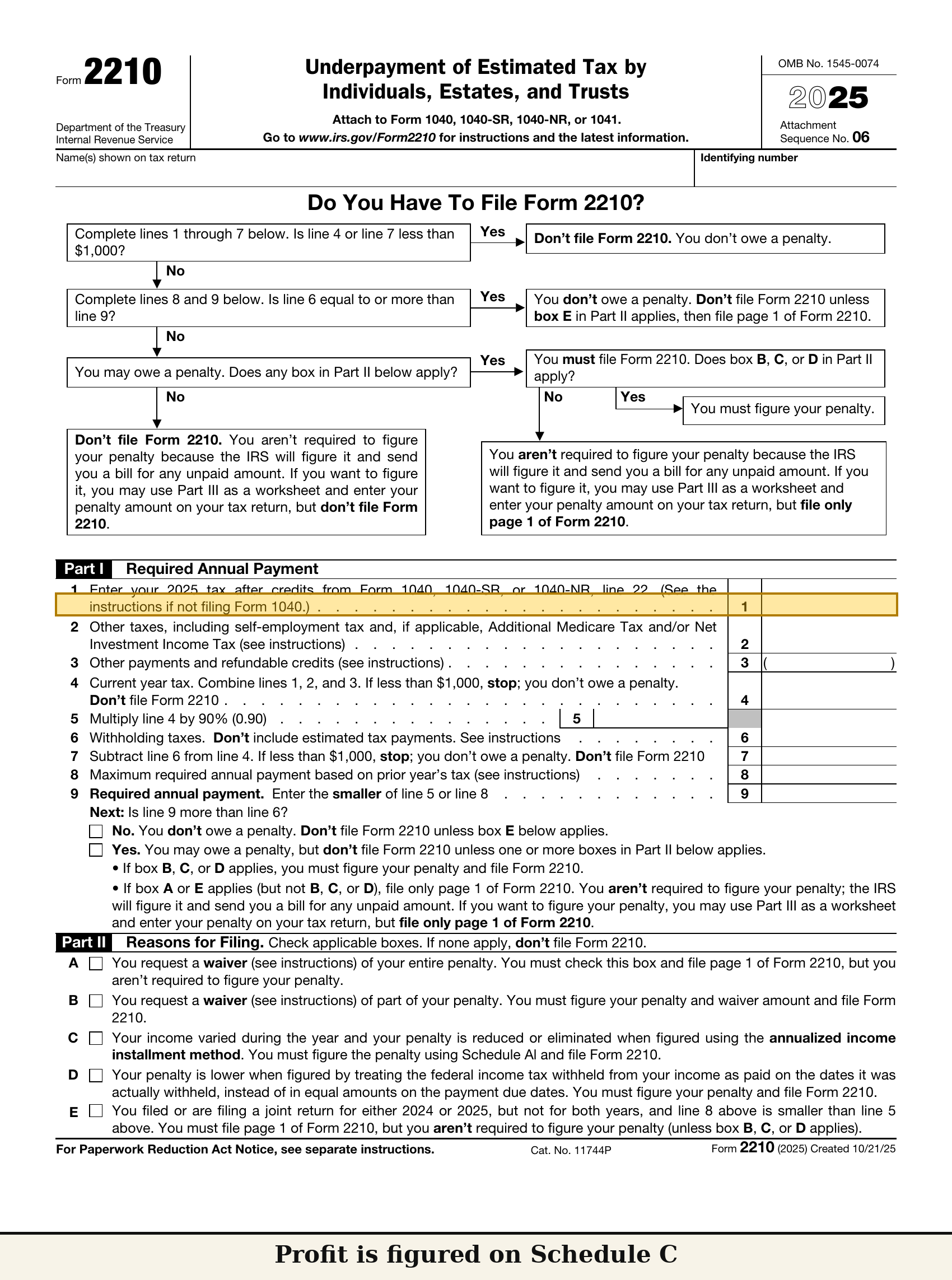
What Form 2210 and Schedule AI do not do, to close the reading.
They do not figure the income itself. The $30,000 of profit in the example was figured on Schedule C before this form begins. They do not figure the self-employment tax: Schedule SE does that, and Part II of Schedule AI annualizes the tax — it does not replace Schedule SE. They do not cover state estimated taxes — this site does not cover state taxes, in this article or any other. And they do not record when income arrived. The period split that every column stands on comes from the filer's own records and dates, which no line on this form can supply or check.
§11Software numbers vs ask-a-human numbers
The last step in this reading is the split this worksheet leaves behind.
One pile is arithmetic a piece of software can carry through Schedule AI on its own: the annualization multiplications on lines 3 and 6, the percentage multiplications on lines 21, 33, and 35, and the smaller-of comparisons on lines 27 and 33 — provided the period figures it is handed are the figures the form asks for.
Numbers and questions to take to a human before acting on them: the split of one year's profit into these cumulative periods, because every column is built on that split; a year that also contains W-2 wages, because the line 30 input changes Part II's arithmetic; and whether the annualized method is the method a particular filer's facts call for, among the methods the form and Publication 505 print.
That is Schedule AI, line 27, as the latest posted form prints it: four cumulative columns — zero in the three periods before this creator earned anything, and the year's installment built in column (d), entering Form 2210 at Part III, line 10. Form 2210 shown is the 2025 edition, the latest posted as of October 7, 2026.
Next article: this site's first full job form — a real estate agent's Schedule C for 2026, read from line 1 to line 31. Article 5
Frequently asked questions
5 questionsReal questions first-time filers asked in public forums — answered only from the lines read in this article.
I'm a contract worker who missed the first-quarter payment and wants to catch up — which options help with quarterly taxes?
Form 2210 figures the underpayment penalty separately for each payment period, and a payment made later in the year does not reach back and erase an underpayment already figured for an earlier period. The printed option for income that does not arrive evenly is the annualized income installment method: Schedule AI recomputes each period from the income actually received by that period's cutoff, instead of dividing the year into four equal installments.
My wife's business started in April, with no Q1 estimate, yet the software shows a penalty despite a large refund — which form explains it?
Form 2210 — the form that figures the penalty period by period rather than on the year as a whole. For a business that earned nothing in the first period, Schedule AI is the worksheet that recounts the periods: its columns are cumulative and each is built from income received by its own cutoff, so in this article's example the columns for the periods before the first income arrived come out at zero required installments.
Is doing the Form 2210 worksheet a waste of time if the IRS figures the penalty itself and never sees the worksheet?
The pieces have different jobs. Publication 505's Worksheet 2-9 figures the annualized payment during the year; the filed piece is Form 2210 itself, with Schedule AI attached — if Schedule AI is used for any due date, it is used for all due dates, box C in Part II of Form 2210 is checked, and Parts I through III go in with the return. The schedule's line 27 results enter Form 2210 at Part III, line 10, where the underpayment is figured.
My consulting started mid-year and I just missed the June 15 estimate deadline — will I be penalized?
This site does not promise an outcome — the penalty is figured period by period from your own completed lines. What Schedule AI shows for a mid-year start is the mechanism: a filer whose income began in June shows zero required installments in columns (a) and (b) — column (b) ends May 31 — and the first nonzero column is (c), January 1 through August 31. The schedule does not skip periods; it recounts them.
My 1099 income varies month to month, and I have no full prior year to base estimates on — is there a method that follows the income I actually received?
That is the method this article reads. Schedule AI does not divide the year into four equal installments; it recomputes each period from the income actually received by that period's cutoff — the columns are cumulative: January 1 through March 31, then January 1 through May 31, January 1 through August 31, and the full year. Each column's line 27 result is entered on Form 2210, Part III, line 10, where the underpayment is figured. There is no column-picking: if Schedule AI is used for any due date, it is used for all due dates, box C in Part II of Form 2210 is checked, and Parts I through III go in with the return.
Sources
15 claimsEvery claim above traces to a document, a tax year, a line, and the date it was checked.
-
1
The underpayment penalty is figured separately for each payment period; a later payment does not erase an earlier period's underpayment
- YEAR
- 2025 — latest posted at check date; 2026 instructions not yet posted
- LINE
- "Who Must Pay" / penalty figured separately per period
- CHECKED
- 2026-10-06
-
2
Form 2210 structure: Part I (lines 1–9) required annual payment → Part II reasons for filing (box C = annualized income installment method) → Part III figuring the underpayment (Schedule AI result at line 10; penalty at line 19, to the return's "Estimated tax penalty" line — line 38 on the 2026 draft Form 1040)
- YEAR
- 2025 form; 2026 draft Form 1040
- LINE
- Form 2210 Parts I–III; Form 1040 line 38
- CHECKED
- 2026-10-06 / 2026-10-07
-
3
Schedule AI columns are cumulative: (a) Jan 1–Mar 31, (b) Jan 1–May 31, (c) Jan 1–Aug 31, (d) Jan 1–Dec 31; annualization amounts on lines 2 and 5 are 4, 2.4, 1.5, 1 (estates/trusts use different amounts — out of scope)
- YEAR
- 2025 form — latest posted at check date
- LINE
- Column headings; lines 2, 5
- CHECKED
- 2026-10-07
-
4
Part I flow: line 1 AGI per period → line 3 annualized income → lines 4–10 deductions and QBI → line 11 annualized taxable income → line 14 tax → line 15 annualized SE tax (from Part II, line 36) → lines 17–19 total taxes less credits
- YEAR
- 2025 form
- LINE
- Lines 1–19
- CHECKED
- 2026-10-07
-
5
Line 20 applicable percentages: 22.5% / 45% / 67.5% / 90%; line 21 = line 19 × line 20; line 22 = earlier columns' line 27 total; line 23 = line 21 − line 22; line 24 = 25% of Form 2210 Part I, line 9, in each column; line 25 = prior column's (line 26 − line 27); line 26 = line 24 + line 25; line 27 = smaller of line 23 or line 26, entered on Form 2210 Part III, line 10
- YEAR
- 2025 form
- LINE
- Lines 20–27
- CHECKED
- 2026-10-07
-
6
If Schedule AI is used for any due date, it must be used for all due dates; check box C in Form 2210 Part II; attach Parts I–III and Schedule AI
- YEAR
- 2025
- LINE
- Schedule AI instructions; Form 2210 Part II, box C
- CHECKED
- 2026-10-06
-
7
Part II (annualized SE tax): line 28 = the period's net profit × 92.35%; if the period's SE income is under $400, Part II is not required / the amount is zero; line 29 = prorated Social Security limit; line 30 = Social Security wages for the period; line 31 = line 29 − line 30; line 32 amounts 0.496 / 0.2976 / 0.186 / 0.124; line 33 = line 32 × smaller of line 28 or line 31; line 34 amounts 0.116 / 0.0696 / 0.0435 / 0.029; line 35 = line 28 × line 34; line 36 = line 33 + line 35 → line 15
- YEAR
- 2025 form / instructions
- LINE
- Part II, lines 28–36
- CHECKED
- 2026-10-07
-
8
The 2025 form's line 29 prints prorated amounts ($44,025 / $73,375 / $117,400 / $176,100) built from the 2025 wage base ($176,100) — deliberately NOT read as 2026 figures anywhere in this article
- YEAR
- 2025 form
- LINE
- Line 29
- CHECKED
- 2026-10-07
-
9
Annualized method on the Publication 505 track: complete Worksheet 2-1 through line 14b first, then the 2026 Annualized Estimated Tax Worksheet (Worksheet 2-9) and use its line 32 result; using the annualized method to figure payments requires filing Form 2210 with the 2026 return
- YEAR
- 2026
- LINE
- Worksheet 2-9 instructions (Annualized Income Installment Method)
- CHECKED
- 2026-10-06
-
10
"What changed for tax year 2026" table: Social Security wage base $176,100 (2025) → $184,500 (2026); Schedule AI line 29 prorated amounts for 2026 left blank pending the final 2026 form; self-employment tax build unchanged
- YEAR
- 2026 wage base; 2025 form for line 29
- LINE
- Contribution and Benefit Base table; Schedule AI line 29
- CHECKED
- 2026-10-26
-
11
Second illustration's column (c) Part II arithmetic: June–August net profit $13,700 → line 28 $12,651.95 → line 33 $2,353.26 (× 0.186) + line 35 $550.36 (× 0.0435) = line 36 $2,903.62 → line 15, column (c); line 29 dollar figure not read, 2026 form not posted
- YEAR
- 2025 form — latest posted at check date
- LINE
- Part II, lines 28, 32–36
- CHECKED
- 2026-10-26
-
12
Period penalty = underpayment rate × underpayment amount × period; underpayment rate = federal short-term rate + 3 percentage points, rounded to the nearest full percent; rate determined in the first month of each calendar quarter and applied during the first calendar quarter beginning after that month; March rate also applies April 1–15 for individual estimated-tax additions
- DOC
- 26 U.S.C. §§ 6654, 6621
- YEAR
- Statute
- LINE
- § 6654(a); § 6621(a)(2), (b)(1), (b)(2), (b)(3)
- CHECKED
- 2026-10-31
-
13
Section 6654 additions computed at the section 6621 rate per annum, without daily compounding
- DOC
- 26 CFR § 301.6621-1; 26 U.S.C. § 6622
- YEAR
- Regulation / statute
- LINE
- § 301.6621-1(a)(3), (c)(2); § 6622(b)
- CHECKED
- 2026-10-31
-
14
2026 quarterly underpayment rates: Q1 7%, Q2 6%, Q3 7%, Q4 7%
- DOC
- IRS Quarterly Interest Rates
- YEAR
- 2026
- LINE
- Underpayment rates table
- CHECKED
- 2026-10-31
-
15
Fourth-quarter 2026 rate of 7% established for the quarter beginning October 1, 2026, and applying to estimated tax underpayments for that quarter; Part III, Section B penalty figured from the instructions' worksheet and Table 2 (daily rates and days)
- YEAR
- 2026 ruling; 2025 instructions
- LINE
- Quarter beginning October 1, 2026; Part III, Section B
- CHECKED
- 2026-10-31
Update log
Changes are dated and kept. Old figures are never silently overwritten.
- Same form Find it by form line
- Next form Filing Extension 2026: Form 4868 Moves the Return, Not the Payment
- Tool 2026 Estimated Tax Worksheet
Free one-page sheet: The $1,000 Line reads the $1,000 test on the 2026 Estimated Tax Worksheet.